
A Professional Judgement is a point in time assessment of your pupils in Balance. The Professional Judgements give you, the teacher, the ability to be accountable and make a judgement on a pupil, that isn't based on results, grades or complex algorithms.
Quick Steps
- Navigate to Admin and select Professional Judgements
-
To create a new statement, click Add Statement. Providing you have space for more statements, a box will appear at the bottom of the list. Click it and you will be able to give your statement a name, a code and select a colour scheme. Click Done when finished.
-
To reorder the list, simply click and drag the judgement to your desired place in the list.
-
To remove a statement, click the bin icon alongside it. Please be aware that deleting a statement will also remove that statement from any pupils it has already been assigned to.
Need More Detailed Help?
Setting your Professional Judgements
Before you can assign judgements to your pupils, your Balance Administrators must first create them, or review the default ones we have in the system already. To begin with, Balance will automatically display five statements (shown below), you can edit these at any time.
To access the Professional Judgement Statement page, click Admin on your main Balance toolbar, before selecting Professional Judgements.
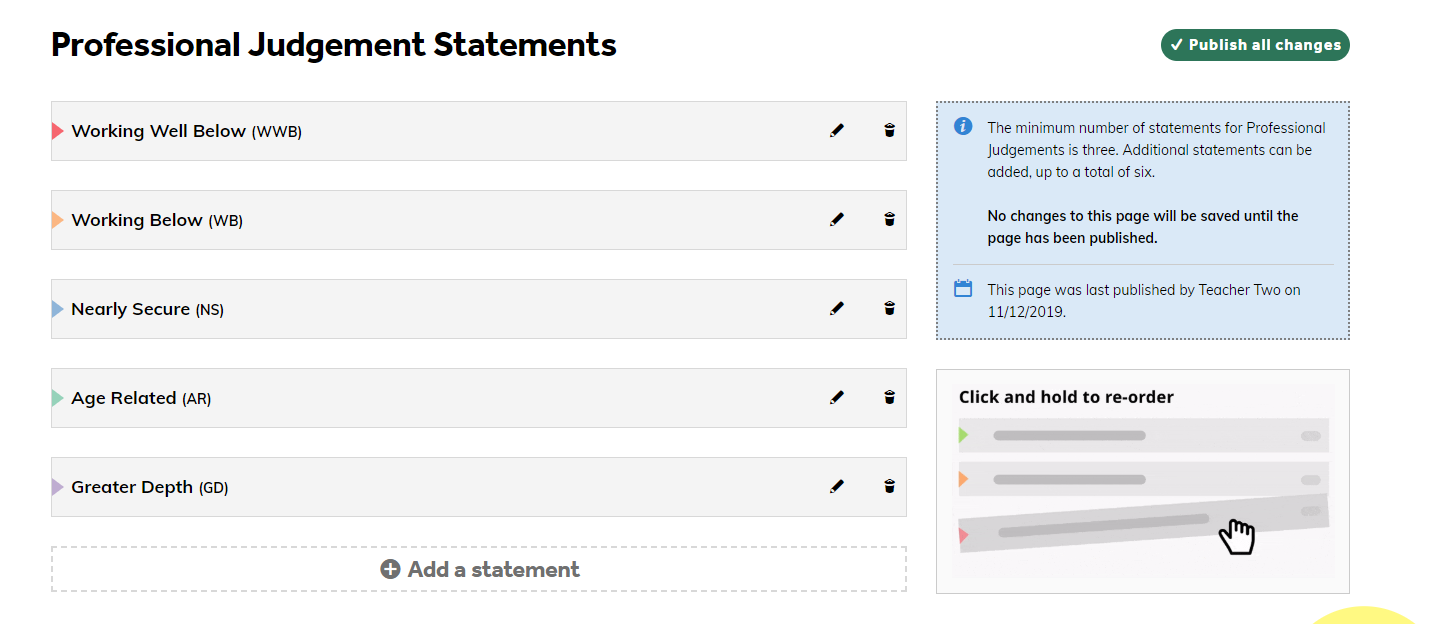
You then have the flexibility to edit or create your own judgements. To create a new statement, click Add Statement. Providing you have space for more statements, a box will appear at the bottom of the list. Click it and you will be able to give your statement a name, a code and select a colour scheme. Click Done when finished. To reorder the list, simply click and drag the judgement to your desired place in the list. Please ensure to click Publish all changes when you are happy with your statements.
Please note: You can only have between three and six judgements.
To remove a statement, click the bin icon alongside it. Please be aware that deleting a statement will also remove that statement from any pupils it has already been assigned to.